
What is a Fixed ThreadPool Executor?
It is a thread pool with
- fixed number of threads
- and unbounded queue for the tasks
Basically a thread pool with following attributes
- corePoolSize =
nthreads - maximumPoolSize =
nthreads - keepAliveTime = 0 milliseconds.

Behaviour of a Thread Pool with fixed number of threads
- At any point, at most
nThreads threads will be active processing tasks. - If additional tasks are submitted when all threads are active, they will wait in the queue until a thread is available.
- If any thread terminates due to a failure during execution prior to shutdown, a new one will take its place if needed to execute subsequent tasks.
When to use a FixedThreadPool?
- When you don’t want your application to consume all the available threads in your system.
- Or when you want to run your application within limited concurrency (controlled by number of threads in fixed thread pool)
What is the right number of threads for the thread pool?
- Technically if you have a
ncore CPU, then it means you can createnthreads in the system.
E.g if you have a 16 core CPU, then you can easily run 16 threads on it. - In reality you can run many more threads
- This is because in most scenarios the threads DON’T always do just computations.
- They may be doing I/O (network, disk, etc), and hence the CPU may be free to process more threads.
- E.g you if your application is I/O heavy, then you may even run 100s of threads, because most threads will be busy doing I/O and CPU will concurrently execute them
- So,
- If each task does not perform any I/O operation, probably the correct number of parallel threads is the number of cores of your hardware.
- If your tasks involve network or disk I/O, it is more difficult to determine the correct level of parallelism to maximize performance.
- Deciding on the number of threads
- First find number of cores available =
Runtime.getRuntime().availableProcessors() - A good rule of thumb is to start around 10 threads per core for a workload that involves disk and network I/O, and see if it’s sufficient to keep all CPUs busy.
- Increase or decrease the number of maximum threads based on results obtained from load testing.
- Multiply this factor by number of cores, to obtain the total size of the thread pool.
- First find number of cores available =
When can a thread pool cause a problem
- Generally creating and destroying a thread and its associated resources can be expensive process in terms of time.
- So thread pool generally helps, like a fixed thread pool that has
nnumber of threads always available. - However, if we end up spawning too many threads in the Java application, then we can very quickly
- run out of resources – as each thread needs memory for its thread stack (2MB per thread)
- and the performance of your application will decrease rapidly – as among others, the CPU needs to do a lot of context switching.
What happens if you have a small thread pool, but huge amounts of tasks to process
- Suppose you have a fixed thread Pool of size
50 - But you have a million of tasks to process
- If you submit these tasks to the thread pool executor – it will not block
- The reason is that the FixedThreadPool Executor, by default uses a
LinkedBlockingQueuewith capacity asInteger.MAX_VALUE - This means for all practical purposes it behaves like an “unbounded” queue
- The reason is that the FixedThreadPool Executor, by default uses a
Code Examples
Lets look at some of the code examples to understand how to use a fixedThreadPool.
Consider the code example below where we are creating a Fixed Thread Pool with 5 threads and handle 20 tasks concurrently.
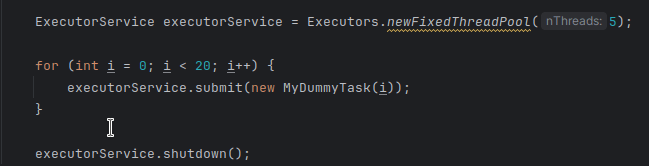
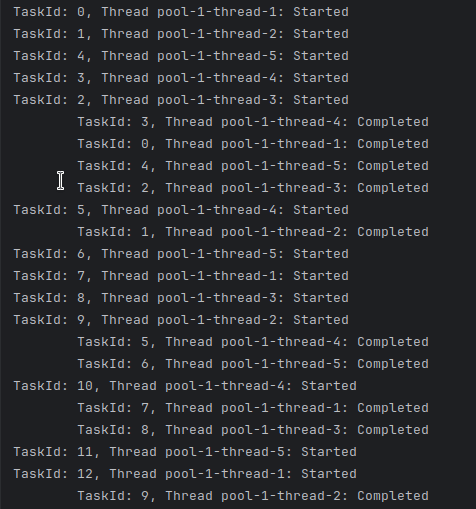
As you can see from the output, at max only 5 threads are processed at any given time.
A newFixedThreadPool(1) , i.e., a fixed pool with size 1, is equivalent to a SingleThreadExecutor
Code located at – https://github.com/chatterjeesunit/java-playground/blob/master/src/main/java/com/corejava/multithreading/executors/nonscheduled/FixedThreadPoolExecutorDemo.java
In our future blogs, we will see other different types of ThreadPoolExecutors like cached, scheduled, etc.

